Product updates
New in Pro 1.8 and Standalone 1.11.
Pro releases
The season behind the score.
Version 1.8
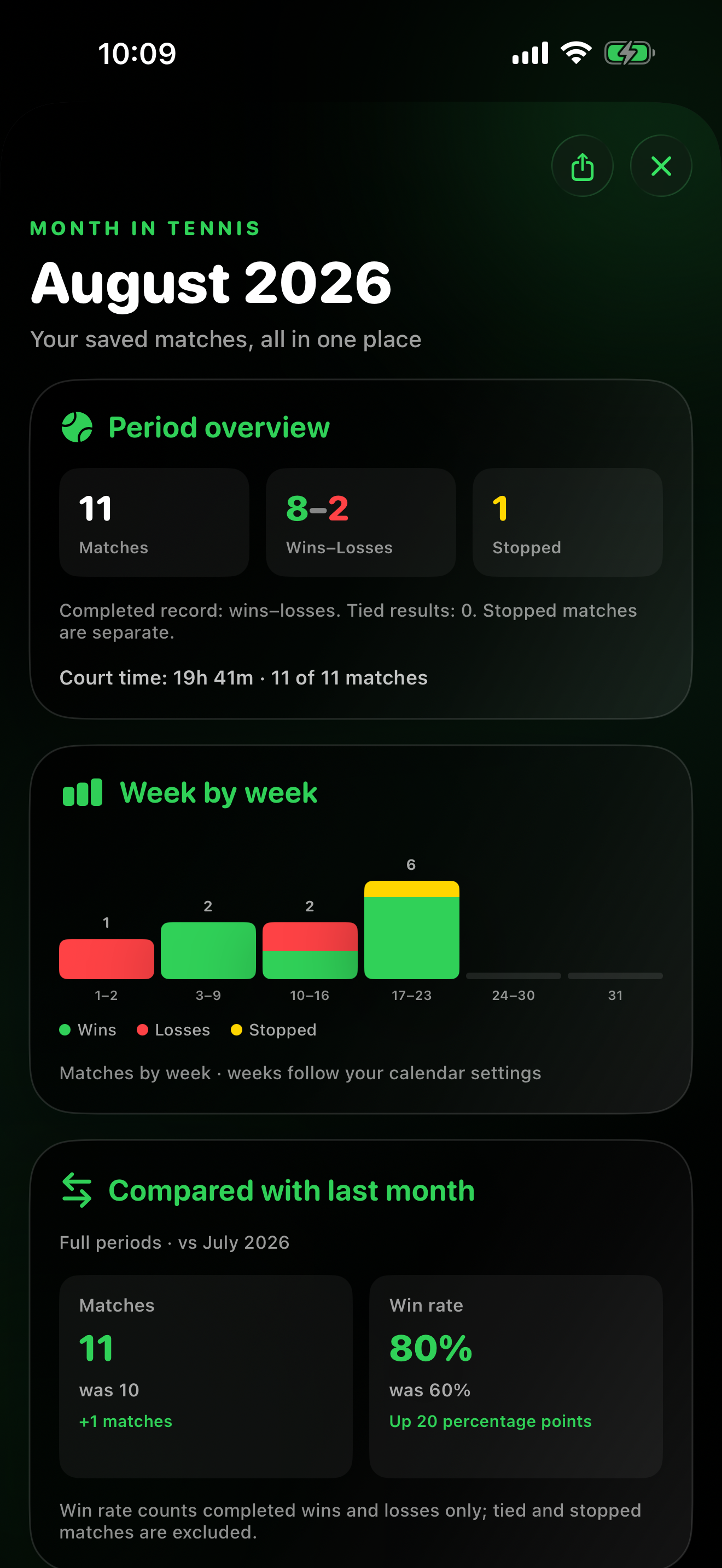
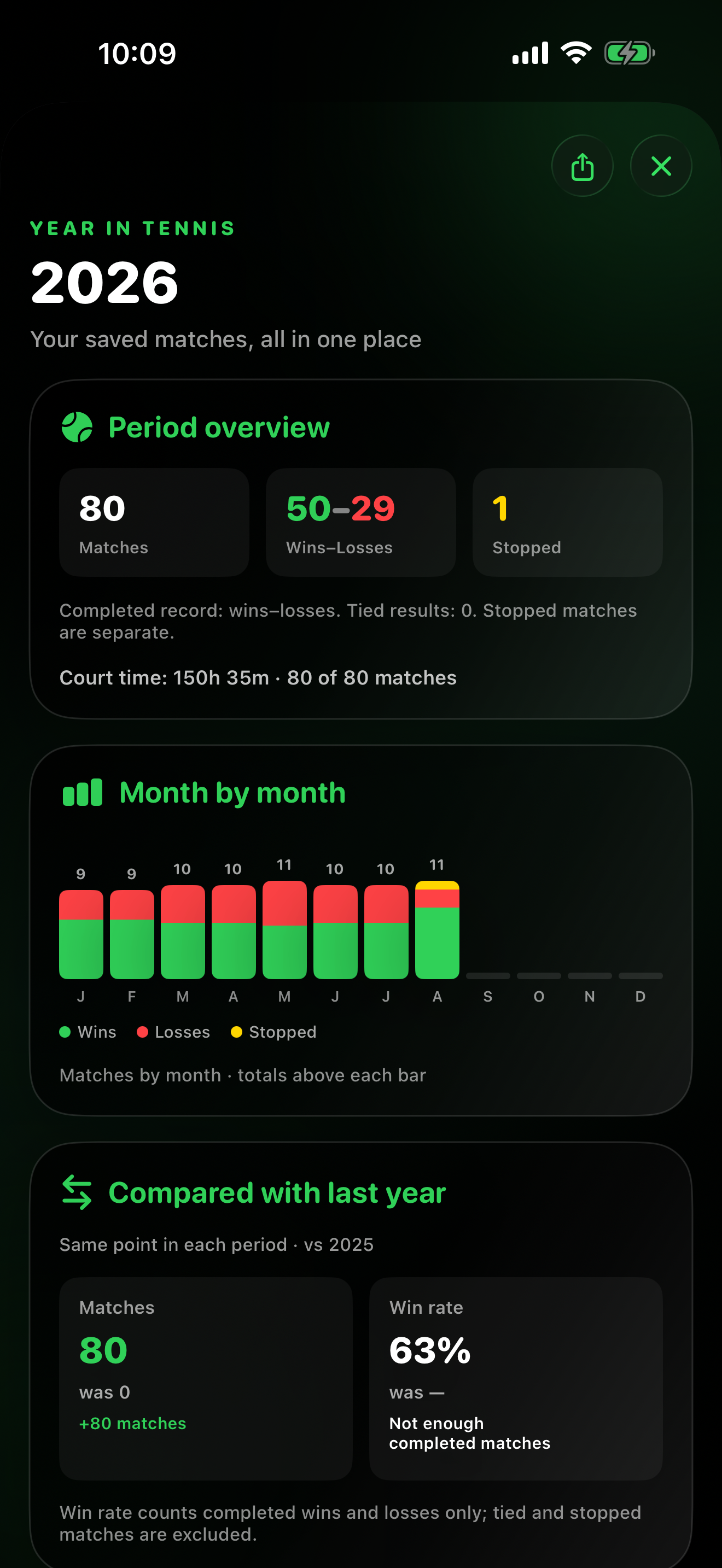
Pro 1.8 adds Month in Tennis and Year in Tennis to the iPhone app and Watch History, using saved matches to show activity, comparisons and achievements.
Latest release
Version 1.8
- Look back on a month or year. Open a period recap from Calendar on iPhone or History on Watch. See the saved-match total, completed wins and losses, and stopped matches separately.
- Follow your activity. Weekly bars in a month and monthly bars in a year distinguish wins, losses and stopped matches. Week boundaries follow your device’s calendar settings.
- Compare periods. Review match count and win rate against the previous month or year when comparable history is available. A week-to-week view uses completed weeks within the selected month.
- Revisit achievements. See period achievements on both devices. In Pro on iPhone, open the match behind an achievement or share a month or year card.
- Keep Momentum accurate. In a stopped match, a final game confirmed by the saved score stays complete. A game stopped before it ends remains marked as unfinished.
How month and year recaps work →
Previous release
Version 1.7
- Follow Match Flow. Switch between Momentum, Scores and Key Moments in iPhone match details. Momentum pairs each game’s winner and point-count intensity with the running game score; Scores shows the game-by-game result; Key Moments selects events supported by the recorded points.
- Keep the point history. New Watch recordings retain their point sequence as part of the saved match. Match Flow also appears for older records when their saved data supports it.
- Review compact Momentum on Watch. Open a recorded match in Watch History to see game bars and running scores, when a valid point log is available.
- Export or back up your history. Create CSV, Excel and PDF reports, or save a restorable JSON or ZIP backup from Match History Files on iPhone. Import adds eligible missing matches without duplicating existing IDs or restoring previously deleted IDs.
- Share a little more of the story. When recorded data supports it, share a separate compact Match Flow image or include a brief flow summary in match text. The existing result card remains focused on the score.
Earlier release
Version 1.6
- Add and edit matches you’ve played. Enter Singles or Doubles results on iPhone, with flexible set rules and optional tie-break points. Save completed matches, stopped matches and ties. Include start and end times or an optional duration, even for matches that cross midnight. Correct a manual match’s time, rules or score later without adding a duplicate; the saved result and subsequent corrections can sync to Apple Watch.
- Find older matches on your wrist. Filter Watch history by year and month, alongside Singles and Doubles. Older matches load as you browse while your complete saved history stays available.
- Keep the context that matters. Add surface, indoor or outdoor setting, venue, court and a private match note. Reuse recent or favorite courts. Add or edit context for older Watch-recorded matches without changing their score or recorded statistics.
- Discover more Match Highlights. The expanded collection covers 26 types of highlights, including comebacks from two sets down, matches where every set ends in a tie-break, milestone wins, record winning streaks and personal bests on return. Match Details shows all applicable highlights supported by the saved data; history-based comparisons use your recorded history.
- Share more than a score. Match cards include up to six prioritized highlights and optional court conditions and location. Layouts adapt to the available information, including two-digit Custom Set and tie-break scores. Personal notes stay private.
- Keep your history consistent. Assigning, changing or removing an opponent refreshes the relevant match and Rivalry views. Manual entries are clearly identified on iPhone and Apple Watch; unavailable statistics stay hidden.
Earlier release
Version 1.5
- Choose One Set, Best of 3, or Best of 5 for Singles and Doubles.
- Use official Short Sets, traditional advantage or tie‑break sets, or build a Custom Set.
- Select Standard Game or No‑Ad independently from the set format.
- Custom Set keeps the game target, win-by rule, tie‑break start, and tie‑break target together as one saved configuration.
- Finished and stopped match cards keep two, three, four, or five sets readable on every supported Apple Watch size.
- History preserves the selected format, full Sets and Games labels, unfinished-set context, and opponents assigned later on iPhone.
- Shared text and visual cards use compact tennis notation, including two-digit set tie‑break scores and deciding Match Tie‑Break results such as [10–7].
- Workout-free and empty stopped matches save only the information that was actually recorded.
- Match Highlights surface up to four noteworthy moments, including comebacks, tie-break battles, streaks, personal bests, and Rivalry milestones.
Version 1.4
Private opponent profiles and Head‑to‑Head Rivalries.
- Create opponent profiles with a full name, a short Watch name, and an optional private note.
- Choose Guest or a saved opponent before a singles match; the selected name stays visible while scoring.
- Rivalries combines record, recent form, sets, games, tie‑breaks, point performance, serve and return, pressure points, patterns, time, workouts, and meetings.
- Assign older matches, synchronize profiles privately, and share a three-card Rivalry story without private notes.
- Optional one-time support never unlocks features or changes scoring.
Version 1.3
A deciding Match Tie‑Break, built into the match.
- When sets are tied before the deciding set begins, choose a Match Tie‑Break to 7 or 10, always win by 2.
- The option works for Singles and Doubles in Best of 3 and Best of 5 matches.
- History and match details show the Match Tie‑Break separately from regular sets, completed sets, and game totals.
- Set tie‑break results use consistent superscript notation across iPhone and shared result cards.
- Performance Stats adds Match Tie‑Break record, win rate, and separate 7-point and 10-point records only when relevant data exists.
- Shared match and performance cards include the same clear Match Tie‑Break results and remain balanced when a section has fewer metrics.
Version 1.2
iCloud sync, clearer Trends, and better sharing.
- Pro and Standalone can synchronize the same saved matches when they use the same Apple Account.
- Direct paired-device transfer and CloudKit synchronization work as independent paths, so either can deliver a saved match first.
- A compact indicator in History on Apple Watch shows Synced, Syncing, Waiting / Saving, or Sync paused / Retry.
- Match histories stay separate when Apple Accounts change, while unsynced matches for the previous account are retained in an encrypted local recovery copy.
- After a successful sync, match history can be restored from iCloud following app reinstallation.
- Performance Trends remembers the last selected Win, Points, Serve, or Return view.
- Recent Results now read chronologically from left to right, with the newest result on the right.
- Shared match cards use clearer spacing and compact tie‑break notation.
Version 1.1.2
Clearer stopped-match statistics
- Stopped matches with a leader count toward Match Record, Win Rate, streaks, and rolling performance trends.
- Tied stopped matches remain neutral and are clearly identified as Tied.
- Clearer streak labels and match-deletion actions.
Version 1.1.1
Clearer match details and sharing
- Clearer player and team identification in match scoreboards.
- Consistent color coding across match details and exported result cards.
- More consistent result indicators for completed and stopped matches.
Version 1.1
Calendar, performance, trends, and sharing
- Month and year Calendar views, including multiple matches played on the same day.
- Performance Stats and Trends with period, Singles, Doubles, and All filters.
- Expanded match analysis and dynamic sharing as text or polished visual cards.
Version 1.0
The Pro experience begins
- The complete scoring app on Apple Watch, connected to iPhone.
- Automatic local match-history synchronization.
- Detailed match and workout review on the larger iPhone screen.
Standalone releases
Your history, month by month.
Version 1.11
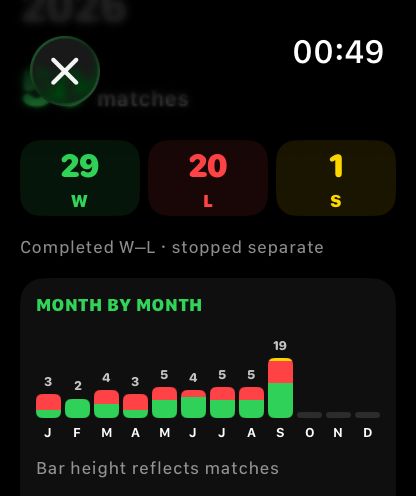
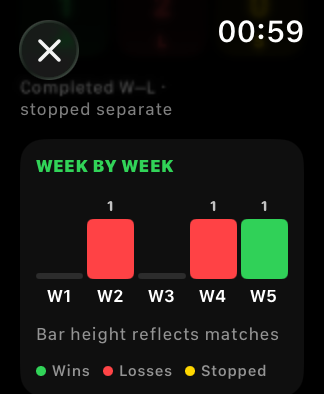
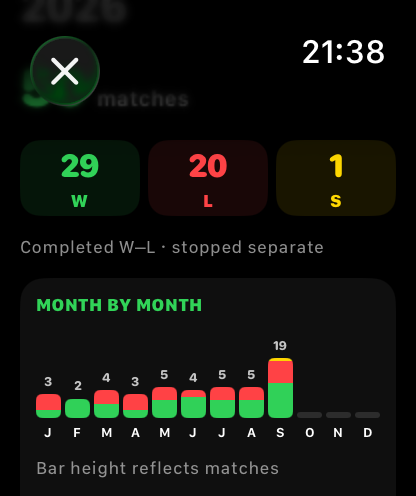
Standalone 1.11 brings month and year recaps to Watch History. Review saved-match activity and achievements on your wrist. Pro on iPhone adds the larger recap and shareable card.
Latest release
Version 1.11
- Review a month or a year. Open the recap from Watch History to see how many matches you saved and how completed wins, losses and stopped matches are counted.
- See the activity pattern. Month and year charts use green for wins, red for losses and yellow for stopped matches, with match totals above the bars.
- Compare your progress. Compare a month or year with the previous period using match count and win rate. A month recap can also compare the two most recent complete weeks within that month.
- Remember standout matches. Period achievements highlight milestones and notable results from your saved history.
- Keep Momentum accurate. A stopped match’s last game appears complete when the saved score confirms it. A game stopped before it ends remains marked as unfinished.
How month and year recaps work →
Previous release
Version 1.10
- See how each recorded set unfolded. Compact Momentum in Watch History shows game-by-game winners, point-count intensity and running game scores when a valid point log is saved.
- Keep more of a new match. Newly recorded matches retain their point-by-point sequence with the saved result, providing a foundation for accurate later analysis.
- Respect older history. Momentum appears for past matches with saved point history. Manually entered results remain available in History.
- Keep scoring familiar. No extra taps are required during play. Standalone remains independent; Pro on iPhone adds the detailed Match Flow views and file export and import.
Earlier release
Version 1.9
- Find that match again. Browse Watch history by year and month, or review a whole year. Combine the period with Singles or Doubles filters. Older matches load as you browse, without removing records from your saved history.
- Your manually added matches, on your wrist. Results entered in Pro on iPhone, including later corrections to time, rules or score, can synchronize to Standalone through private iCloud under the same Apple Account. History updates the same record, marks it Added manually and shows the saved result without empty point-statistics or workout cards.
- Match context travels with the result. Optional court details and match notes are preserved in synchronized match records. Add or edit this context in Pro on iPhone; your original Watch scoring data stays unchanged.
- More consistent saved history. Opponent changes and record updates are handled more reliably, with readable manual-match history across small and large Apple Watch displays.
Live scoring remains fully on Apple Watch. Manual match entry, manual score editing and context editing are iPhone features in Pro; Match Highlights are displayed on iPhone and shared cards, not on Watch.
Earlier release
Version 1.8
- Choose One Set, Best of 3, or Best of 5 for Singles and Doubles.
- Play official Short Sets, traditional advantage or tie‑break sets, or a Custom Set.
- Select Standard Game or No‑Ad independently from the set format.
- Configure a Custom Set by game target, win-by rule, tie‑break start, and tie‑break target.
- Finished and stopped results keep two to five set cards readable across 40, 44, 46, and 49 mm Apple Watch displays.
- History uses full Sets and Games labels and keeps custom-format details readable without clipped text.
- Opponent assignments synchronized from Pro remain attached to the saved match in Standalone history.
- New format controls use the same haptic confirmation as the rest of match setup.
Version 1.7
Saved opponents on Apple Watch.
- Create and manage opponent profiles in Pro on iPhone; Standalone receives them through private iCloud synchronization.
- Choose Guest or a synchronized opponent before a singles match and keep the selected name visible while scoring.
- The saved assignment synchronizes back so the match appears in the same Rivalry on iPhone.
- If no profiles are synchronized, setup remains unchanged; Doubles does not assign one opponent to a team match.
Version 1.6
A deciding Match Tie‑Break, entirely on Apple Watch.
- When sets are tied before the deciding set begins, choose a Match Tie‑Break to 7 or 10, always win by 2.
- The option works for Singles and Doubles in Best of 3 and Best of 5 matches.
- The live screen keeps the target, tied-set context, server, and point score visible.
- History and match details store the Match Tie‑Break separately from regular sets and game totals.
- Existing saved matches remain readable with their saved scoring details.
Version 1.5
Standalone now syncs saved matches through iCloud.
- Standalone and Pro can synchronize the same saved matches when they use the same Apple Account.
- A compact status in Watch History shows Synced, Syncing, Waiting / Saving, or Sync paused / Retry.
- Match histories stay separate when Apple Accounts change, while unsynced matches for the previous account are retained in an encrypted local recovery copy.
- After a successful sync, saved match history can return following app reinstallation on the same Apple Account.
- Scoring and local history remain available when iCloud is unavailable, and the app can synchronize later.
- Match deletions synchronize so removed history does not reappear on another device.
Version 1.4.1
Stopped-match and workout reliability
- Stopped matches with a leader count as a statistical win or loss; tied stopped matches remain neutral.
- Done returns to setup while the workout finishes saving to Health in the background.
- Saved workout details update automatically after Health finishes saving the workout.
Version 1.4
Redesigned History and match statistics
- A redesigned History overview with All, Singles, and Doubles filters plus match record and win rate.
- Clearer saved-match summaries and consistent statistics sections.
- Refined layouts for compact and larger Apple Watch displays.
Version 1.3.1
History management
- Delete every saved match from Apple Watch History in a single action.
- A clear confirmation step helps prevent accidental deletion.
Version 1.3
Apple Watch face access
- Apple Watch face complications.
- Support for circular and corner complication positions.
- Direct launch from supported watch faces.
- New Help Center and improved online documentation.
Version 1.2.1
Workout reliability
- More reliable workout statistics.
- Improved heart-rate and active-energy data.
- Better workout completion and history updates.
Version 1.2
Automatic match statistics
- Point, serve, return, break-point, and match-flow statistics.
- Point summaries in match history.
- Updated in-app Help and interface refinements.
Version 1.1
Workouts in Health
- Tennis workout recording and live heart rate.
- Match duration and workout details.
- Remembered match setup and a new About section.
Version 1.0
The first complete release
- Singles, Doubles, Best of 3, and Best of 5.
- Configurable tie‑break rules and coin toss.
- Match history, Undo, and a Watch-optimized interface.